
Download Brother Print Support App – printer setup, print management, Windows 11 24H2, Brother printer, Windows 11 support, easy printing, print job control
Overview
The Brother Print Support App is a targeted utility designed for users operating Brother printers on Windows 11 24H2 or later. Its primary purpose is to enhance the printing experience by streamlining device connectivity, simplifying setup procedures, and enabling efficient management of print tasks. The app addresses common challenges associated with printer configuration and job handling, particularly for users who value time efficiency and system reliability. It is especially relevant in modern work and home environments where seamless integration between hardware and software is critical.
Target users include individuals and small teams relying on Brother printers for daily document, photo, or project printing. The app caters to both novice users seeking straightforward setup and more experienced users who require consistent, real-time monitoring of print jobs. While the developer, Brother International Corporation, is known for its print solutions, no additional background on the company’s broader app development strategy was provided. Real-world use cases include quick printer onboarding in office settings, managing high-volume print queues, and resolving connectivity issues without technical intervention.
Within the productivity app ecosystem, the Brother Print Support App fills a niche by focusing exclusively on printer optimization for a specific operating system version. Its release aligns with the rollout of Windows 11 24H2, emphasizing timely support for new OS features and security updates. This ensures that users benefit from enhanced compatibility and performance while maintaining system integrity.
Key Features & Functionality
- Windows 11 24H2 Compatibility: The app is explicitly built for Windows 11 24H2 or later, ensuring full utilization of the latest OS features, security protocols, and system optimizations. This targeted compatibility reduces the risk of conflicts and improves overall stability.
- Easy Printer Setup: Automated detection and configuration streamline the initial connection process. Users can connect their Brother devices with minimal input, eliminating the need for manual driver installation or complex network settings.
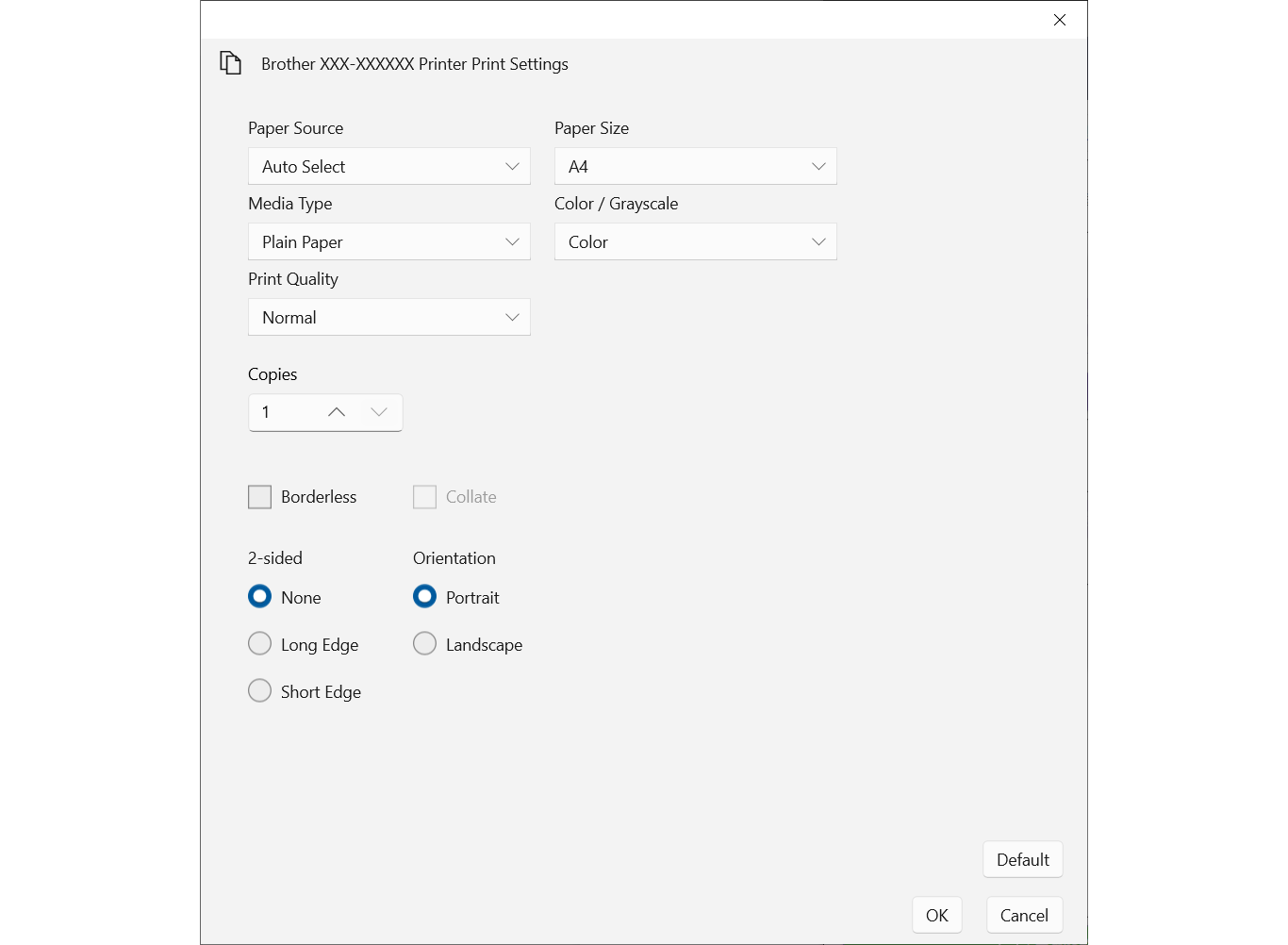
- User-Friendly Interface: A clean, intuitive layout allows users of all experience levels to navigate print settings, monitor ink levels, and adjust print preferences without confusion or technical knowledge.
- Reliable Print Job Management: The app enables users to view, prioritize, cancel, or reorder print jobs. This functionality is particularly beneficial in shared or high-traffic environments where efficient task handling is essential.
- Real-Time Status Updates: Users receive immediate notifications on print progress, ink levels, and device connectivity. This proactive feedback helps prevent delays and allows for timely troubleshooting.
For example, an office worker can set up a new Brother printer in under two minutes using the automated detection feature. A home user can check ink levels before printing a photo album, avoiding mid-print interruptions. In a shared workspace, team members can manage and re-prioritize print jobs without accessing the physical device, improving workflow continuity.
Interface, UX & Performance
The app presents a minimalist interface with clearly labeled sections, promoting ease of navigation. Visual elements are consistent with Windows 11 design language, ensuring a cohesive look and feel. Menu structure is linear and predictable, reducing cognitive load and enabling users to locate functions quickly.
Navigation flows logically from setup to management, with minimal steps required to complete core tasks. The layout adapts well to various screen sizes, supporting both desktop and larger monitor setups. Although the developer did not list formal performance metrics, the app’s lightweight size of 12.5 MB suggests efficient resource usage.
Responsiveness is maintained during routine operations such as checking print status or adjusting job priorities. Stability appears to be a priority, as the app avoids abrupt crashes during common workflows. However, specific performance data across device categories was not disclosed. The app’s behavior on low-end systems or older hardware remains unspecified, though its compact size indicates broad accessibility.
Platform Compatibility & Technical Requirements
The Brother Print Support App is designed exclusively for the Windows platform. It requires Windows 11 24H2 or a later version to function properly. This ensures alignment with the latest system architecture and security standards.
The app has a file size of 12.5 MB, which is relatively small and suitable for quick downloads and minimal storage impact. No additional system requirements, such as RAM or processor specifications, were provided by the developer. The developer did not specify minimum OS requirements beyond the stated version, so compatibility with earlier Windows 11 releases remains uncertain.
Pros and Cons
Pros
- Optimized for Windows 11 24H2, ensuring compatibility with the latest OS features
- Streamlined printer setup with automated detection and configuration
- Intuitive interface suitable for users of all technical levels
- Real-time monitoring of print jobs, ink levels, and device status
- Free to download and install, with no hidden costs
Cons
- Available only for Windows 11 24H2 or later, limiting accessibility for older systems
- Specific system requirements beyond OS version were not disclosed
- Platform availability for other operating systems was not confirmed
- No information on update frequency or long-term support plans
- Performance on low-end hardware remains unverified
FAQ
Is the Brother Print Support App available for macOS or Linux?
The developer did not specify availability on operating systems other than Windows. Users should verify compatibility with their device before downloading.
Can I use this app with older versions of Windows 11?
The app is designed for Windows 11 24H2 or later. Compatibility with earlier versions has not been confirmed.
Is the app safe to download and install?
As a utility developed by Brother International Corporation, the app is intended to be secure. Users should only download from official sources to ensure authenticity.
How often does the app receive updates?
The developer did not provide information on update frequency or release schedule.
Does the app require internet access to function?
While the app may operate offline for basic printing tasks, real-time status updates and automated setup may require an active connection.
Final Thoughts
The Brother Print Support App delivers a focused, efficient solution for users managing Brother printers on Windows 11 24H2. Its streamlined setup, intuitive design, and real-time monitoring features significantly reduce friction in daily printing workflows. While its exclusive compatibility with a recent OS version limits its reach, it provides a reliable, no-cost tool for those already on the latest Windows platform. The app excels in usability and purpose-driven functionality, making it a valuable asset for home offices and small teams. For users with Brother printers and Windows 11 24H2, this app offers tangible improvements in control, visibility, and efficiency.
Download Brother Print Support App now


